Published: 10/15/2025
🕒 5 min read
Ryzen 5000 / 7000 / 9000: Precision Boost Overdrive + Curve Optimizer
Tune PBO power/thermal limits and apply per-core Curve Optimizer offsets to raise effective boost and cut temps. This version gives clear presets for Zen 3, Zen 4, and Zen 5 - without the clutter.
Prerequisites
BIOS/UEFI
Update to the latest stable (AM3/AM4/AM5). Enable EXPO/XMP first.
Cooling
240mm or 360mm AIO recommended for sustained boost.
Monitoring
HWiNFO64; Ryzen Master optional for best core IDs.
Stress Tools
Cinebench 2024/R23, OCCT, and your games.
Thermal Target
Daily peak ≤ 75°C. Many prefer 60-70°C for noise/thermals.
Quick Terms
PBO
Allows boost beyond stock within PPT/TDC/EDC and thermal limits.
PPT / TDC / EDC
Package power / sustained current / burst current caps.
Scalar
Extends boost residency (more heat if set too high).
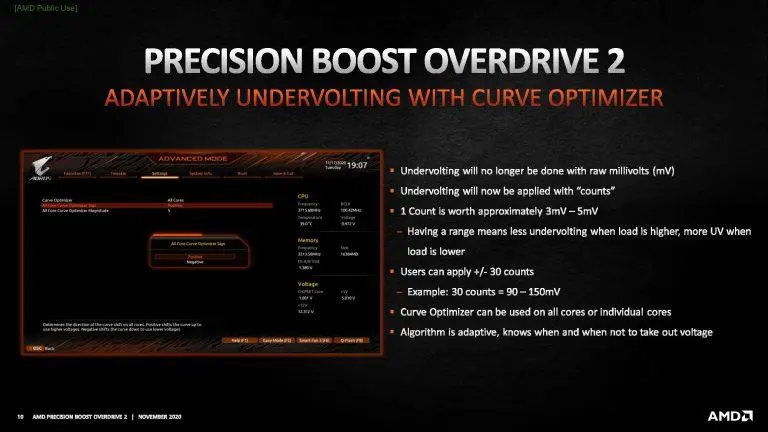
Curve Optimizer (CO)
Per-core voltage-frequency curve offset. Negative = less voltage.
Boost Override
Optional +MHz on top of PB. Only if temps/voltage allow.
Safety First
- Change one setting at a time and test between steps.
- Crashes/WHEA 18 → make the core’s CO less negative or lower Scalar/PPT.
- On mid-range coolers, aim for 80–88°C under heavy multi-core load.
Suggested Templates (By Generation)
Zen 5 - Ryzen 9000
PBO Manual or Advanced
PPT 125W / TDC 110A / EDC 160A
Scalar
2× or Auto
Temp Target
60-65°C
CO Per-Core (start)
best −8 to −12, mid −12 to −18, weak −18 to−22
Silicon Note
Golden silicon can reach as far as −50 on select cores (upper bound).
Zen 4 - Ryzen 7000
PBO Manual or Advanced
PPT 125W / TDC 110A / EDC 160A
Scalar
2× or Auto
Temp Target
60-70°C
CO Per-Core (start)
best −8 to −12, mid −12 to −18, weak −18 to −20
Silicon Note
Strong bins can approach −40 on best cores (upper bound).
Zen 3 - Ryzen 5000
PBO Manual or Advanced
PPT 120–130W / TDC 95–110A / EDC 150–170A
Scalar
2x or Auto
Temp Target
60°C to 65
CO Per-Core (start)
best −5 to −10, mid −10 to −15, weak −15 to −18
Silicon Note
Good silicon often tops out around −30 (upper bound).
Curve Optimizer Workflow
Fast Method (All-Core First)
- CO → All Cores → Negative: start −10.
- Loop Cinebench ~10 min; watch temps/clocks.
- If stable, try −15 then −20. Back off 5 on any WHEA/crash.
Best Method (Per-Core)
- Identify “best” cores in Ryzen Master/HWiNFO.
- Smaller negatives on best cores; larger on weaker ones.
- Test: Cinebench → OCCT small/large → your games; nudge outliers by 2–3.
Optional Tweaks
Eco-lean daily
Keep PBO on, cap PPT ~88–105W, moderate CO for big noise/temp wins.
Boost Override
+100–200 MHz if temps/voltages allow (watch stability).
Scalar discipline
Stay ≤ 2× unless cooling is excellent.
Memory next
After CPU is stable, tune EXPO/timings separately.
Troubleshooting
- Boot loops → Clear CMOS → defaults → EXPO → re-apply milder CO.
- Game-only crash → make that core’s CO less negative by 2–3 or reduce Scalar.
- Instant 90°C → lower PPT or Scalar; improve cooler/fan curve.
- Worse scores than stock → CO too aggressive; reduce negatives/Scalar.
- WHEA 18 events → back off CO; also confirm RAM stability.
Final Thoughts
Treat −50 (Ryzen 9000), −40 (Ryzen 7000), and −30 (Ryzen 5000) as upper-bound silicon-lottery targets, not defaults. Most CPUs settle lower, and per-core tuning always beats blanket values. Keep temps in check and iterate slowly. Pair your tune with good cooling, a sensible PBO/CO overclock, and a PC optimized with HD OPTI for the best gaming gains: lower time-between-frames, steadier frametimes, reduced input lag, and a snappier, more competitive feel.
On dual-CCD Ryzen X3D chips like 7900X3D, 7950X3D, 9900X3D, and 9950X3D, use the Windows Balanced power plan for gaming. Balanced keeps effective core parking enabled so Windows (with AMD’s 3D V-Cache scheduler) can park the non-cache CCD and steer game threads onto the V-Cache CCD automatically. In BIOS, enable AMD CPPC and CPPC Preferred Cores; where your board offers a choice, set the CPPC preference to Prefer Cache (instead of Prefer Frequency). This combo maximizes cache-hit rates in games while still letting the high-freq CCD wake for background or mixed workloads when needed.