Published: 4/22/2025
🕒 3 min read
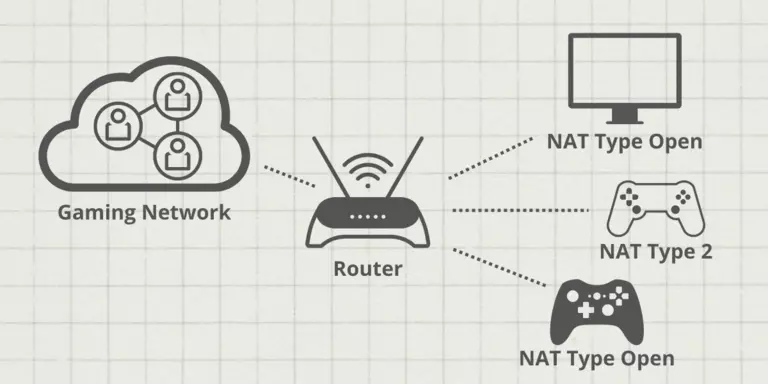
Struggling with NAT issues, lag, or failed connections in multiplayer games or remote tools? Port forwarding opens specific routes in your router, letting traffic reach your device directly for smoother experiences and full feature access.
Source: Port Forward
What Is Port Forwarding?
Port forwarding is a router configuration that redirects requests from the internet to a specific device on your local network. It’s essential for enabling external access to services like game servers, Remote Desktop, or security cameras.
Without it, inbound traffic is blocked or filtered, causing restricted functionality or connection issues.
When Should You Use It?
- Hosting game servers (Minecraft, Rust, CS:GO, etc.)
- Accessing your PC remotely via RDP/VNC
- Peer-to-peer apps like BitTorrent or Syncthing
- Fixing console/PC NAT Type issues
- Running home servers or smart home services
Before You Start
- ✅ Know your router login (your Default Gateway): often
192.168.1.1or192.168.0.1 - ✅ Assign a static IP (or DHCP reservation) to the target device
- ✅ Identify the required ports for your game/app
- ✅ On Windows, press Win + R →
cmd→ipconfig. Note yourIPv4 Address(device IP) andDefault Gateway(router).
How to Set Up Port Forwarding
Follow these steps to add a forward rule:
Step 1: Access Your Router
- Open a browser and enter the router IP (e.g.,
192.168.1.1). - Log in with admin credentials.
Step 2: Find the Port Forwarding Page
- Look for Port Forwarding, Virtual Server, or NAT.
- Click to add a new rule.
Step 3: Enter the Rule
- Enter the device’s local IP (the static IP you set).
- Enter the port or range (e.g.,
25565for Minecraft). - Select protocol (TCP, UDP, or both), then save/apply.
Advanced Tips
- DDNS: use Dynamic DNS if your WAN IP changes frequently.
- Test your ports with canyouseeme.org.
- UPnP caution: Convenient but can be risky if abused by apps. Disabling it improves control, but may break auto-port features in some games.
Call of Duty Port Forwarding Table
TCP and UDP ports used by various Call of Duty titles across PC, PlayStation, and Xbox.
| Game | Platform | TCP Ports | UDP Ports |
|---|---|---|---|
| Call of Duty: Black Ops 6 | PC | 3074,3075,27015-27030,27036-27037 | 3074,4380,27000-27036 |
| Call of Duty: Black Ops 6 | PlayStation | 1935,3074,3478-3480 | 3074,3478-3479 |
| Call of Duty: Black Ops 6 | Xbox | 3074 | 88,500,3074,3544,4500 |
| Modern Warfare III / Warzone / MW II | Steam | 3074, 27015, 27036 | 3074, 27015, 27031-27036 |
| Modern Warfare III / Warzone / MW II | PC | 3074, 4000, 6112-6119, 20500, 20510, 27014-27050, 28960 | 3074, 3478, 4379-4380, 6112-6119, 20500, 20510, 27000-27031, 27036, 28960 |
| Modern Warfare III / Warzone / MW II | PlayStation | 3478-3480 | 3074, 3478-3479 |
| Modern Warfare III / Warzone / MW II | Xbox | 3074 | 88, 500, 3074, 3544, 4500 |
| Vanguard | PC | 3074, 27014-27050 | 3074-3079 |
| Vanguard | PlayStation | 1935, 3478-3480 | 3074-3079, 3478-3479 |
| Vanguard | Xbox | 3074 | 88, 500, 3074-3079, 3544, 4500 |
| Black Ops Cold War | PC | 3074, 27014-27050 | 3074, 3075, 3076, 3077, 3078, 3079 |
| Black Ops Cold War | PlayStation | 1935, 3478-3480 | 3074, 3075, 3076, 3077, 3078, 3079 |
| Black Ops Cold War | Xbox | 3074 | 3074, 3075, 3076, 3077, 3078, 3079 |
| Mobile | Android / iOS | 80, 443, 65010 (Lobby), 65050 (Chat) | 7500-8000 |
| Modern Warfare (2019) | PC | 3074, 27014-27050 | 3074, 3478, 4379-4380, 27000-27031, 27036 |
| Modern Warfare (2019) | PlayStation | 1935, 3478-3480 | 3074, 3478-3479 |
| Modern Warfare (2019) | Xbox | 3074 | 88, 500, 3074, 3075, 3544, 4500 |
| Black Ops 4 | PC | 3074, 27014-27050 | 3478, 4379-4380, 27000-27031, 27036 |
| Black Ops 4 | PlayStation | 80, 443, 1935, 3478-3480 | 3478-3479 |
| Black Ops 4 | Xbox | 53, 80, 3074 | 53, 88, 500, 3074, 3075, 3544, 4500 |
| WWII | PC | 3074, 27015-27030, 27036-27037 | 3074, 4380, 27000-27031, 27036 |
| WWII | PlayStation | 80, 443, 3074, 3478-3480 | 3074, 3478-3479 |
| WWII | Xbox | 53, 80, 3074 | 53, 88, 500, 3074, 3076, 3544, 4500 |
Source: Activision Support
Steam and Other Games Port Forwarding Table
Common TCP/UDP ports for Steam-based games and services.
| Game / Service | TCP Ports | UDP Ports |
|---|---|---|
| Steam Client | 27014–27050 | 3478, 4379, 4380, 27000–27031, 27036 |
| Steam Downloads | 80, 443 | N/A |
| Steam Voice Chat | N/A | 3478, 4379, 4380 |
| Steam Remote Play | 27036, 27037 | 27031–27036 |
| CS2 Dedicated Server | 27015, 27036 | 27015, 27031–27036 |
| Halo Infinite | 3074, 27015, 27036 | 88, 500, 1353, 3074-3075, 3544, 4500, 27015, 27031-27036 |
| Apex Legends - Epic Games | 1024-1124, 3216, 9960-9969, 18000, 18060, 18120, 27900, 28910, 29900 | 1024-1124, 18000, 29900, 37000-40000 |
| Apex Legends - Steam | 1024-1124, 3216, 9960-9969, 18000, 18060, 18120, 27015, 27036, 27900, 28910, 29900 | 1024-1124, 18000, 27015, 27031-27036, 29900, 37000-40000 |
| Overwatch 2 - Battlenet | 1119, 3724, 6113 | 3478-3479, 5060, 5062, 6250, 12000-64000 |
| Overwatch 2 - Steam | 1119, 3724, 6113, 27015, 27036 | 3478-3479, 5060, 5062, 6250, 12000-64000 |
| Splitgate 2 - Steam | 27015, 27036 | 27015, 27031-27036 |
Source: Steam Support
Final Thoughts
Port forwarding unlocks direct access to services behind your router—essential for gamers, developers, remote workers, and home-server enthusiasts.
Always secure exposed services with strong passwords, up-to-date software, and only the ports you actually need open.
For more networking and PC optimization tips, explore the rest of our HD articles.